Wednesday, February 6, 2013
7 Essential Principles of Innovative Learning
A recent article on Mind Shift titled, "7 Essential Principles of Innovative Learning," by Katrina Schwartz talks about principles to keep in mind to engage students in learning. In her writing she includes a few very good observations about the need to learn how to be a self-directed lifelong learner. Below are a few excerpts.
“Adaptive expertise tries to push beyond the idea of mastery,” said Jennifer Groff, an educational engineer and co-founder of the Center for Curriculum Redesign. “You may be proficient, but without adaptive expertise you can get stuck very quickly as the world shifts.”
“You may be proficient, but without adaptive expertise you can get stuck very quickly as the world shifts.”
She ends the article with a brief description of an innovative learning environment, "Students aren’t broken up into grade levels, instead they learn in mixed-age groups as well as in groups of roughly the same age. Learning is directed by students, often project-based, evaluated primarily through writing and projects, self-assessments and peer-assessment. The schedule is periodic, focusing on a topic like geography or history for three to four weeks and crossing into multiple disciplines. The teacher is seen as an active mentor and coordinator and the school has active parental involvement."

Thursday, January 24, 2013
Contact us know if you discover a TOEP resource that should be added or removed
For today's exercise I chose to explore the blog/wiki section. Since TOEP is a collaborative project among a number of SUNY campuses there are individuals who are writing up the content and curating the resources that come from a variety of backgrounds and experiences. This collaborative development is a very rewarding process and we are all learning quite a bit from each other as we pool our knowledge bases.
Through TOEP I discovered the Chronicle of Higher Ed Blogs where I stumbled onto an idea I plan to try out.
"When I sit next to a friend in a conference audience who has never collaboratively written anything in Google Docs and suggest we take notes together."
I anticipate that this experiment may lead to some insights about the conference sessions that I may not discover on my own and to new thoughts about the collaborative writing process.
As I was reviewing the content of the blog/wiki section I made further refinements to tweak and narrow down to just the very best resources. If anyone ever has input regarding a link that may not have be most relevant or up-to-date, or better yet if you stumble on a tremendous resource that is not included, make sure to contact the TOEP team to let us know. This is the best way to make the TOEP pilot project the most effective learning resource for everyone involved.
Sunday, January 20, 2013
Use Google searches to access custom Tech Support
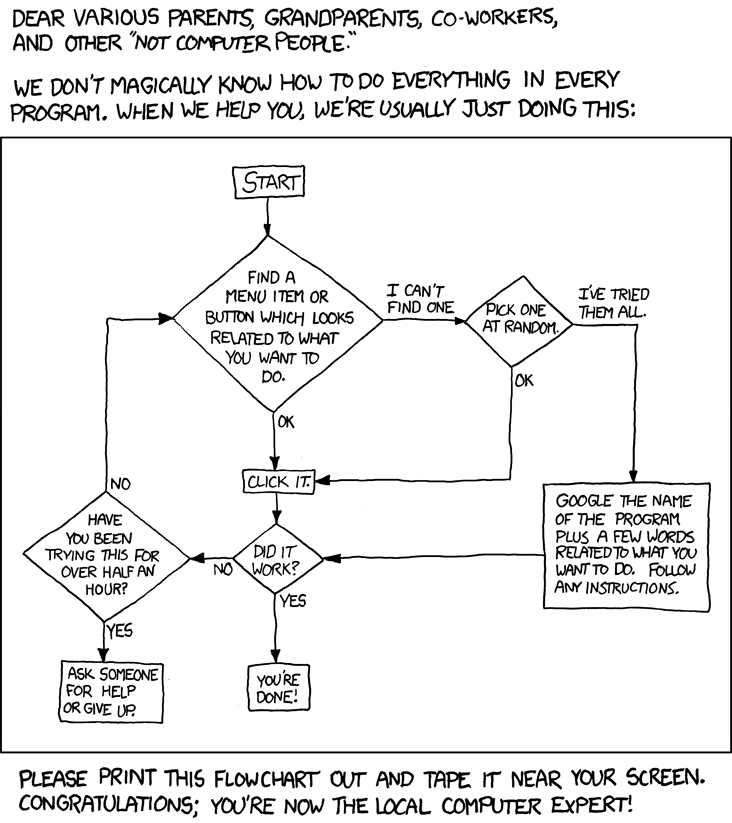
I found this cartoon titled, "Tech Support Cheat Sheet," created by XKCD, a webcomic of romance, sarcasm, math, and language.
This cartoon gives great advice. One of the best ways to get your own customized tech support is to do a Google search for a few key words relating to your problem. If you are getting an error, include a few words from the error in your search. Enclose a phrase from the error in quotes to narrow down the results. Another trick I use is to use the Search Tools to limit the time period to just results in the past year. This helps ensure I get results that are for a current version of the software or tool in question.

Saturday, January 12, 2013
Follow me by email
I added the Google Gadget to my blog to allow others to follow my posts by email. This is one way you can keep up to date. I'll add posts about TOEP and inclued tips about some of the tools. You can also bookmark or subscribe using RSS. If the TOEP team needs to share critical info we will send out email.
The order of the TOEP sections have been modified to move the more difficult concepts later on. The section on RSS and social bookmarks are now further down in the list. If you already finished these sections that's great. We also made the RSS discovery excercise simpler.
These changes came about as a result of feedback we received. Please continue to let us know what changes you think would make TOEP the most effective for your professional development needs, which is the goal of this TOEP pilot.
The order of the TOEP sections have been modified to move the more difficult concepts later on. The section on RSS and social bookmarks are now further down in the list. If you already finished these sections that's great. We also made the RSS discovery excercise simpler.
These changes came about as a result of feedback we received. Please continue to let us know what changes you think would make TOEP the most effective for your professional development needs, which is the goal of this TOEP pilot.
Friday, December 28, 2012
Photo sharing discoveries
The images I'll use to include in this post about photo sharing are pictures of my new office at the TLC South. Stop in and say hi.

Although I've used both Flickr and Picasa, I pushed a little bit further to improve my understanding about the two tools. I often struggle to decide which best suits my needs, so I took some time to review some comparisons. I found this site comparing Flickr vs. Picasa. I tend to prefer Picasa and below are a few of the reasons why.
Picasa has an application you can download and install to your computer which adds the ability to organize photos on my computer. The Picasa application also includes basic editing capabilities. Picasa lets you upload images that are twice as large in their file size. This means that I can upload better quality images. This was what originally swayed me towards choosing Picasa. Flickr puts limits on the number of photos that can be uploaded per month, and Picasa in comparison provides a limit on the storage you can use. This limit can be increased if you upgrade to the pro version. And Picasa works seamlessly with other Google tools like Blogger. One of Flickr's strength is that it excels as a robust community to share photos and comments.
I also explored Apple's Photo Stream. The most recent version added the feature to create public albums on the web. I don't understand why this wasn't a part of Photo Stream originally. Although a benefit of Photo Stream is that my recent photos are shared across all my devices, it still seems like Photo Stream has not fully evolved yet. Here's a link to a few more pictures of my new space uploaded as a public Photo Stream album.
Pixlr is an online photo-editing software similar to the full version of Adobe Photoshop, except it's web-based and it's free. I recommend you check it out for your photo editing needs.

Although I've used both Flickr and Picasa, I pushed a little bit further to improve my understanding about the two tools. I often struggle to decide which best suits my needs, so I took some time to review some comparisons. I found this site comparing Flickr vs. Picasa. I tend to prefer Picasa and below are a few of the reasons why.
Picasa has an application you can download and install to your computer which adds the ability to organize photos on my computer. The Picasa application also includes basic editing capabilities. Picasa lets you upload images that are twice as large in their file size. This means that I can upload better quality images. This was what originally swayed me towards choosing Picasa. Flickr puts limits on the number of photos that can be uploaded per month, and Picasa in comparison provides a limit on the storage you can use. This limit can be increased if you upgrade to the pro version. And Picasa works seamlessly with other Google tools like Blogger. One of Flickr's strength is that it excels as a robust community to share photos and comments.
I also explored Apple's Photo Stream. The most recent version added the feature to create public albums on the web. I don't understand why this wasn't a part of Photo Stream originally. Although a benefit of Photo Stream is that my recent photos are shared across all my devices, it still seems like Photo Stream has not fully evolved yet. Here's a link to a few more pictures of my new space uploaded as a public Photo Stream album.
Pixlr is an online photo-editing software similar to the full version of Adobe Photoshop, except it's web-based and it's free. I recommend you check it out for your photo editing needs.
Monday, November 26, 2012
TOEP has taught me a lot - and I will likely learn a lot more
In this blog post I'll talk about my learning relating to RSS and newsreaders. I've use an RSS newsreader to collect and subscribes to a number of sites prior to the requirement for the Tools of Engagement discovery activity. Even though, I learned quite a bit through this TOEP task.
The first thing I learned is that in addition to RSS standing for "really simple syndication" it also means "rich site summary." This second meaning seems to be a simpler way to understand what an RSS feed is used for.
Another thing I learned is that Bloglines, which is an RSS reader similar to Google Reader, is alive and well. When I implemented a project similar to TOEP in my course my students discovered mid-semester how transient technology is. Bloglines was the de facto standard for newsreaders. As my students approached the RSS discovery activity Bloglines was suddenly discontinued. This I saw as a teachable moment; no matter how "standard" a technology seems to be - there's always a new "standard" right around the corner. A principle that TOEP tries to instill is that one should never get too caught up in the tool and instead learn the principles behind how and why a broad technology concept is used.
And the third thing I learned through TOEP was how to make a public blogroll. The link on the TOEP site to View All Blog Entries was created as a result of conversations among the TOEP team members to try to find a way to make the reading (and browsing) of other TOEP participant's blog entries easier. When my students reviewed their classmates blogs they had to click each blog post. NOW all TOEP blog posts are easily scannable from a single blogroll page.
I learned this new time-saving technique as a result of TOEP and as a result of being able to communicate with others about what my goals were and collectively we discovered a way to accomplish this goal. I'm sure this is just one example of many ways we will all learn along side each other through TOEP.
The first thing I learned is that in addition to RSS standing for "really simple syndication" it also means "rich site summary." This second meaning seems to be a simpler way to understand what an RSS feed is used for.
Another thing I learned is that Bloglines, which is an RSS reader similar to Google Reader, is alive and well. When I implemented a project similar to TOEP in my course my students discovered mid-semester how transient technology is. Bloglines was the de facto standard for newsreaders. As my students approached the RSS discovery activity Bloglines was suddenly discontinued. This I saw as a teachable moment; no matter how "standard" a technology seems to be - there's always a new "standard" right around the corner. A principle that TOEP tries to instill is that one should never get too caught up in the tool and instead learn the principles behind how and why a broad technology concept is used.
And the third thing I learned through TOEP was how to make a public blogroll. The link on the TOEP site to View All Blog Entries was created as a result of conversations among the TOEP team members to try to find a way to make the reading (and browsing) of other TOEP participant's blog entries easier. When my students reviewed their classmates blogs they had to click each blog post. NOW all TOEP blog posts are easily scannable from a single blogroll page.
I learned this new time-saving technique as a result of TOEP and as a result of being able to communicate with others about what my goals were and collectively we discovered a way to accomplish this goal. I'm sure this is just one example of many ways we will all learn along side each other through TOEP.
My first blog entry for the SUNY Tools of Engagement Project (TOEP)
This is my first blog entry in response to the SUNY Tools of Engagement Project (TOEP) a set of self-paced on-demand professional development activities. The objective of this project is to provide an opportunity for faculty to explore new instructional technologies to discover how these tools might be useful to assist teaching and learning.
A basic premise of TOEP is to encourage self-discovery in a safe environment while promoting a community of learners. TOEP recently received funding through a SUNY Innovative Instruction Technology Grant (IITG). In addition to supporting the further development of the project, research will also be conducted to determine if this form of professional development is effective to provide faculty with the knowledge they need to be able to use the new technologies for the purpose of communication and collaboration and to provide skills to allow the development of meaningful and engaging assessments to gauge student learning.
TOEP requires faculty to develop a personal blog to reflect on what their new knowledge about the tools means for them personally and how it relates to their discipline. As the main PI on the project I am disqualified to be considered for incentives available to faculty from participating institutions, however, I will also document my reflections through my own blog entries.
The first TOEP activity asks to view a video about lifelong learning and comment on which habit is the most appealing and which is most difficult. The most appealing to me is to play. This is what drives some of the successes that the many projects that TOEP is modeled after have achieved. In a safe and non-threatening environment I'm free to explore, make mistakes, learn from my mistakes, and succeed.
The most difficult habit for me is habit #3 - viewing problems as challenges. The video points out that we often learn the most as a result of the curve balls life throws at us. This can loosely be interpreted as being able to easily adapt to change. Once I'm comfortable with a process I'm afraid to change to something I'm less familiar with. However, this trait is most useful to be able to grow to become a transliterate person in today's technological society. Transliteracy is defined by Sue Thomas as, “the ability to read, write and interact across a range of platforms, tools and media from signing and orality through handwriting, print, TV, radio and films, to digital social networks.” Since technologies change so rapidly many established technologies are often phased out and replaced with something new. A trait of someone who is transliterate and tech savvy is someone who is able to adapt to change in relation to mastery of new tools.
The most difficult habit for me is habit #3 - viewing problems as challenges. The video points out that we often learn the most as a result of the curve balls life throws at us. This can loosely be interpreted as being able to easily adapt to change. Once I'm comfortable with a process I'm afraid to change to something I'm less familiar with. However, this trait is most useful to be able to grow to become a transliterate person in today's technological society. Transliteracy is defined by Sue Thomas as, “the ability to read, write and interact across a range of platforms, tools and media from signing and orality through handwriting, print, TV, radio and films, to digital social networks.” Since technologies change so rapidly many established technologies are often phased out and replaced with something new. A trait of someone who is transliterate and tech savvy is someone who is able to adapt to change in relation to mastery of new tools.
So, this concludes first blog entry for TOEP. I will track the successes of my peers as they make progress and try to comment on some of the entries submitted by others. Although I am personally already quite familiar with a number of the technologies in TOEP I will strive to reach new understandings that challenge my current level of understanding. I will explore how these tools can be useful in relation to my personal needs and in relation to my responsibility to provide effective support for faculty who I work with on a day to day basis as an instructional designer. My progress will be based on my own intrinsic motivation to succeed. I hope everyone has personally rewarding experiences progressing through the discovery-based learning activities in TOEP.
Subscribe to:
Posts (Atom)